I've uploaded new versions of the NSW Wooden Buffers to the DLS, and they should be available soon. The good news is the flicker is Totally Gone!... the bad news is I couldn't get my new arrangement of the lamp working the way I wanted, so I went back to the old way (Two separate models). I'd eventually like to script it and have just a single model portray both versions, with the lamp activated or hidden by a script, but that's a low priority right now.
I had a look at the NSW Train Stop (and the UK one I also did) but cant see whats wrong with it. In TS2009, the script seems like it isnt running at all. Weird. I noticed that someone else has "fixed" the Train Stops as there is a new version on the DLS, unfortunately I cant download anything due to the servers being busy. Its so annoying to not be able to retrieve a copy of your own content.
Anyway, when I get the updated Train Stop, I'll first see if I can fix its Trainz Build. These were intended for TRS2006, but someone has set it up for TC or above. Then I'll see if I can figure out why the script isn't running. Strangely enough, the object I modelled the script from, still runs fine with its original script.
I don't have any pics right now, but Ive spent some time texturing the 86 Class. Its *so* close to being ready for export, but there is a lot of work to be done after that (scripting) so dont think that means its due for release any time soon. I have the body about 70% textured, with just the small fiddly bits left to map. Once its in Trainz, I can concentrate on the Tangara while I start putting the scripts together.
The 86 Class and Tangara will share much of the script (They're both Electric Multiple Units, so share similar functions) so both models will benefit. I expect the 86 Class will be on my test track for some time, while it gets all its scripting and other planned goodies. I anticipate the Tangara will be ready before it.
With the Tangara, Ive been thinking its time to upgrade it to 3DS Max. It was originally intended for TRS2006, but here we are at TS12. I still have to catch up on my Trainz versions but I will get TS12 as soon as I can and probably aim the Tangara at TS2009 now. At this stage, I havent started to convert it, but I have a fairly good process for exporting from Gmax to 3DS Max, so when I get started that part of it shouldnt take long.
I'll see if I can have some pictures of the latest work ready for next time.
Showing posts with label Train Stop. Show all posts
Showing posts with label Train Stop. Show all posts
Tuesday, June 14, 2011

Friday, June 03, 2011
Slow Progress
Well, its been some time since my last update. The last couple of years have taken me in different directions, but all the while, this project has been in the back of my mind. I know I have (or had) a lot of people watching, and by now some of them may have given up, and I dont blame them, but the wheel has turned and I've found myself back here again.
For many years I've wanted to build a model railway, but never had the space for it. It occurred to me recently that these days, with the various rail simulators available, younger people would probably just build a virtual railway than use up an entire room for their hobby. Virtual railways have a big advantage when it comes to space. you can easily create a layout that is much bigger than anything you could build in a room, and a lot more interactive. I still plan on filling a room with trains one day, but recently I've started building my own virtual railway in Traiinz TS2009.
There are a couple of existing routes that I like. They're big. They're Australian, specifically New South Wales. They're full of NSWGR and SRA content, and they look and feel quite good, but they all have similar problems. I considered updating one of them with better content, replacing thousands of signals with the NSW ones available on the DLS, replacing all the stations with better ones, etc, etc. About the only thing I didnt have to change was the scenery.
Add to that the problem of older content not working properly, or failing to load entirely, I came to the conclusion that I would have to build much of it myself, from scratch, right down to the 3D models, since a lot of the classic NSW content are progressive meshes which are no longer supported.
So I've decided to make this a long term project, like a physical model railway, that I work on when I have the time. Anything I produce will be available in some form or other, and I may even consider making them available for other rail simulators as well.
The first thing I need to do is fix my own content. The buffers have always flickered, and I have a new version without any flicker that I am putting some final touches on. I changed it a little and now attach the lamp to the buffer, and then the corona to the lamp, but Im having a little trouble getting the corona to attach to the right point. I'm not even sure at this stage that its possible. I'll figure it out eventually.
The Train Stop will be next. I only just realised that stopped working, and even worse, causes other signals on the route to fail. Its a scripting problem, and I'll have that sorted out, and updated on the DLS as soon as I can.
Then its back to the Tangara and the 86 Class. I really miss the real 86 Class and finishing off the model will at least let me see it running again. I have another side project as well, but I cant talk about that. Im updating someone elses content, and will have to waiit until its done and I contact them again before I can announce it. Its not a big job, just a little time consuming.
Finally theres my route. That will be put together over time. Since the 86 Class were built for hauling coal and container trains through the mountains, naturally it features mountains. At the highest point the rail is 600m above sea level, and I plan to have a port at sea level too, so it's going to be big, with lots of gradients, and will have a city area for the Tangara and other commuter trains.
It sounds like Im taking a lot on, when its already taken me a long time to produce what I've already started, but I'm hoping that by combining it all together, and adding a route that I'll have the full package and that will motivate me to work on some part of it or other. One of the problems of just working on the 3D models is that when I get stuck, or need a break from modelling, I just stop. This way I'll have other things, like the route to go on with.
So thats the plan. As soon as I have the buffer and Train Stops fixed, I'll add an update on my progress here. I also have some Tangara and 86 Class updates to write as well.
For many years I've wanted to build a model railway, but never had the space for it. It occurred to me recently that these days, with the various rail simulators available, younger people would probably just build a virtual railway than use up an entire room for their hobby. Virtual railways have a big advantage when it comes to space. you can easily create a layout that is much bigger than anything you could build in a room, and a lot more interactive. I still plan on filling a room with trains one day, but recently I've started building my own virtual railway in Traiinz TS2009.
There are a couple of existing routes that I like. They're big. They're Australian, specifically New South Wales. They're full of NSWGR and SRA content, and they look and feel quite good, but they all have similar problems. I considered updating one of them with better content, replacing thousands of signals with the NSW ones available on the DLS, replacing all the stations with better ones, etc, etc. About the only thing I didnt have to change was the scenery.
Add to that the problem of older content not working properly, or failing to load entirely, I came to the conclusion that I would have to build much of it myself, from scratch, right down to the 3D models, since a lot of the classic NSW content are progressive meshes which are no longer supported.
So I've decided to make this a long term project, like a physical model railway, that I work on when I have the time. Anything I produce will be available in some form or other, and I may even consider making them available for other rail simulators as well.
The first thing I need to do is fix my own content. The buffers have always flickered, and I have a new version without any flicker that I am putting some final touches on. I changed it a little and now attach the lamp to the buffer, and then the corona to the lamp, but Im having a little trouble getting the corona to attach to the right point. I'm not even sure at this stage that its possible. I'll figure it out eventually.
The Train Stop will be next. I only just realised that stopped working, and even worse, causes other signals on the route to fail. Its a scripting problem, and I'll have that sorted out, and updated on the DLS as soon as I can.
Then its back to the Tangara and the 86 Class. I really miss the real 86 Class and finishing off the model will at least let me see it running again. I have another side project as well, but I cant talk about that. Im updating someone elses content, and will have to waiit until its done and I contact them again before I can announce it. Its not a big job, just a little time consuming.
Finally theres my route. That will be put together over time. Since the 86 Class were built for hauling coal and container trains through the mountains, naturally it features mountains. At the highest point the rail is 600m above sea level, and I plan to have a port at sea level too, so it's going to be big, with lots of gradients, and will have a city area for the Tangara and other commuter trains.
It sounds like Im taking a lot on, when its already taken me a long time to produce what I've already started, but I'm hoping that by combining it all together, and adding a route that I'll have the full package and that will motivate me to work on some part of it or other. One of the problems of just working on the 3D models is that when I get stuck, or need a break from modelling, I just stop. This way I'll have other things, like the route to go on with.
So thats the plan. As soon as I have the buffer and Train Stops fixed, I'll add an update on my progress here. I also have some Tangara and 86 Class updates to write as well.
Sunday, June 18, 2006
Train Stops Updated
 Ive just uploaded an updated version of the Train Stops to the DLS. This update fixes a problem with the stops being in an unknown state until the signal has changed at least once. The revised version now properly syncs itself to the signal, and will appear in the right position (up or down) when the route is first loaded. Allow a couple of days for it to pass through the approval process. Compatible with TRS2004 and above.
Monday, April 24, 2006
Buffer Progress
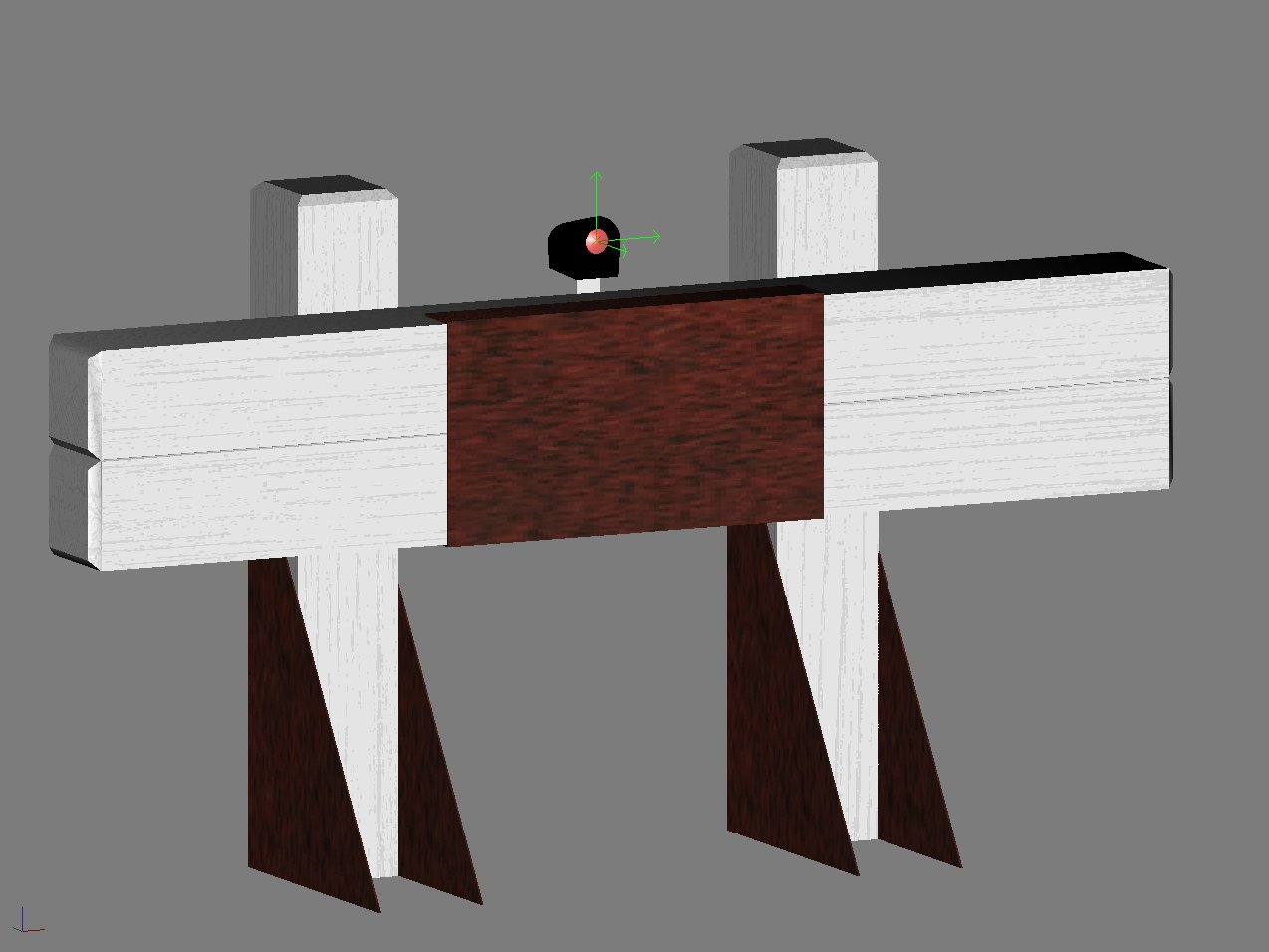 I guess Ive needed a break from the Tangara. This is normal for me. I spend months focused on a single project and then have to get away from it for a while. Im sure that I will get back to that soon.
Ive done some more work on the buffer stops that I started months ago, and now have the model finished. Im still trying to get the textures right, but this is a good thing, as I really do need to learn more about texturing before I start trying to skin something as complex as the Tangara.
As always, Ive read tons of forum posts and tutorials, and am jumping right in, avoiding many newbie mistakes. Ive figured out the relationships between ambient, diffuse, and specular lighting. Ive tweaked Gmax so that it will actually output these values (the default Asset Creation Studio settings dont do specular etc) and Im using the Max plugins so that bump mapping will work.
The Content Creation Guide recommends that you should only use bump mapping on locomotives, but I am experimenting with it here, because these buffers have a coarse wood grain which normally shows as bumps under the thick white paint that they are covered in. You can see the grain in the picture, but that screen grab has no bump mapping and looks kind of flat. When I get something that I am happy with, I'll move on to the scripting.
Its set up as a signal (as buffers should be), and I have set up the light that way too. Ive seen other buffers which use seperate corona effects or a night mesh to light them, but to me, setting the lamp up as a signal light seems like the right way, and works fine. I'd like to script it so that the light can optionally be placed in the center (as shown) or moved to the left or right post, or completely removed, since I have seen many different configurations in my travels.
Im thinking of using mesh attachments to do this, with a properties dialog used to switch them on and off. I will start on the script once Im happier with the way Trainz is rendering the textures.
Train Stop Fixes
Someone pointed out some problems with the train stops - most notably they werent initialising properly and would be in the wrong position until at least one train had passed. This has now been fixed.
There is also another issue, which I think is related to TRS2004 since I cant reproduce it in 2K6, where if you fly back to a signal, crossing a base board boundry as you go, the train stop appears in its default position, despite nothing having changed since you last saw it in the correct position. At this stage, I dont think there will be a fix for that one, as it seems that there are no obvious messages or hooks when this happens that I could detect and bind a fix to.
I'll be uploading an updated version soon.

Monday, February 13, 2006
Right-handed Train Stop released
Last week I had a request for a right-hand version of the train stop for use in the UK, specifically the London Metro and Underground. I hadnt thought about a right-hand version, since ours are on the left, and to be honest, I have no idea where else they might be used.
It took me about an hour to make the nescessary changes, test it, and send it to the download station. It should be approved in a day or so - look for "UK Train Stop" as the asset name.
It took me about an hour to make the nescessary changes, test it, and send it to the download station. It should be approved in a day or so - look for "UK Train Stop" as the asset name.
Saturday, January 28, 2006
Well, its about time!
 I spent yesterday on Sydney Harbour, celebrating Australia Day. I even got a bit of a tan. Last week, I attended a friends wedding, and entertained some other friends that my wife invited over for dinner. It would have been rude of me to sit at the computer and ignore them. I have also been working late at my real job to catch up on some things that are a bit behind, and will still need to work late from time to time over the next couple of months, but hopefully the weddings and national holidays are over, for a while anyway.
Over the last couple of weeks, besides all of the other things that have distracted me, I have been doing a bit of research, and finishing up the Train Stop. I uploaded it to the DLS last night, but am just waiting on some last minute formalities before I release it from the preview area so that you can download it. I was so excited that I uploaded it before I had checked it properly, and ended up having to upload it again after removing some debugging code that I had left in the script.
I also realised that I should probably ask permission to modify one of Natvander's scripts. I had not thought about it since there was nothing in the license or in the script itself that said I couldn't, so I just presumed that it was ok. Then, after had I uploaded the Train Stop, my better judgement convinced me that I should at least ask, out of courtesy. I will be delaying the release. until I get this cleared up.
Last week, I also had an idea for a really quick and small model... the NSW Track Flag. It took me just a few hours to knock it out, and script it (ok... it took about 8 hours - but that included 4 hours of tearing out my hair trying to figure out TrainzScript :) The flag was uploaded a few days ago, but I currently have an update awaiting Auran approval, so if you havnt downloaded it already, you should probably wait until mid next week. If you have, download it again once the update is available.
Recently I signed up with HET (Historic Electric Traction) - probably the first of many organisations I will be supporting. They are a group of volunteers who contract their services to Railcorp, to restore and maintain Railcorp's historic fleet of electric passenger trains. They work out of the old Redfern Workshops, which is just a few blocks from here, and I hope to go down there occasionally and help them maintain the red rattlers and other historic trains that they have there. I have a bit of an alterior motive as well - I hope to get some photographs of the buildings and particularly Traverser No 1, and model them for Trainz.

A couple of other Trainz projects have shown up on the horizon. Im very interested in the Cityrail project (recreating the Sydney Cityrail network in Trainz) and have offered to help build any models that the guys might need to support that. Naturally the Tangara is going to be a part of it, but I have my eye on a few stations and buildings around the place as well.
Next week, I plan to work on the Tangara some more. I havnt done much over the last 2 weeks, and hope to make that up next week. I spotted a few glitches that will need looking at, but nothing major. I should have the gangway finished very soon, and will probably then work on the glitches. Now that the Train Stop is out of the way, I hope to finish the buffer, and start on the catenary splines and related static bits and pieces.
Oh, and my other task for this weekend, is to set up a website for Redfern Workshopz to allow me to add a few features that cant be done on this blog. More on that, as it progresses.
Tuesday, January 17, 2006
Progress Report
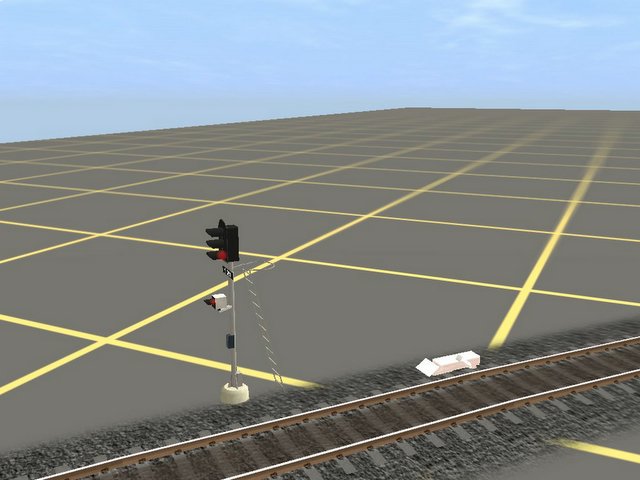 I spent some time this weekend working on the Train Stop, since a couple of people asked about it recently. The model is finished, it has a rough texture, and now, the script finally works.
Trainz Script is even more painful than making textures. It has a hundred different ways to do similar things. You have to figure out which way is the right one for your situation, and despite one method name being similar to another (ie: inferring that they are part of the same method family) they work in completely different ways!.
Take SetMeshAnimationState() for example. I was alternating between that and SetFXAnimationState() since I was not sure which was the right one to use in my situation. Both come from the MeshObject class, but they work in slightly different ways. While SetMeshAnimationState plays through the whole animation once, either forward or in reverse (which is what I wanted), SetFXAnimationState starts or stops the animation loop (which I didnt want). I originally had the animation set up as an effect, but my example script (grabbed from the forums) was using SetMeshAnimationState. Naturally this combination wasnt working. When I finally figured out I needed the FX version of the method for an effect, the animation looped (not what I had in mind). I ended up having to reconfigure the model, in order to use the SetMeshAnimationState method, which is the one I wanted to use all along.
I spent many hours figuring that out, and now finally have it working properly.
A few final steps remain before its ready for the DLS. Im dying to get my green "DLS Contributor" flag, but before I can upload it I have to tweak the model to move its origin slightly, tidy up the script to remove a few unused functions, and redo the textures.
Trainz seems to always render the textures lighter than they really are, meaning that you have to make your textures darker for them to look right. Being slightly colourblind, Im already battling with getting the textures to look right, and on top of that I have to make them look too dark in Gimp. Its never easy.
At least its one step closer to the DLS now.
No real improvements on the Tangara this week. Im three file versions ahead of where I was last week, but thats not really much of a change. The Buffer model still needs finishing, although Im already using it in a couple of routes. That shouldnt take long. I'll probably get to that after I release the Train Stop. Hopefully by the time its ready, the current problems with uploads being rejected for no apparent reason, will be fixed.
Sunday, December 11, 2005
Textures are a pain
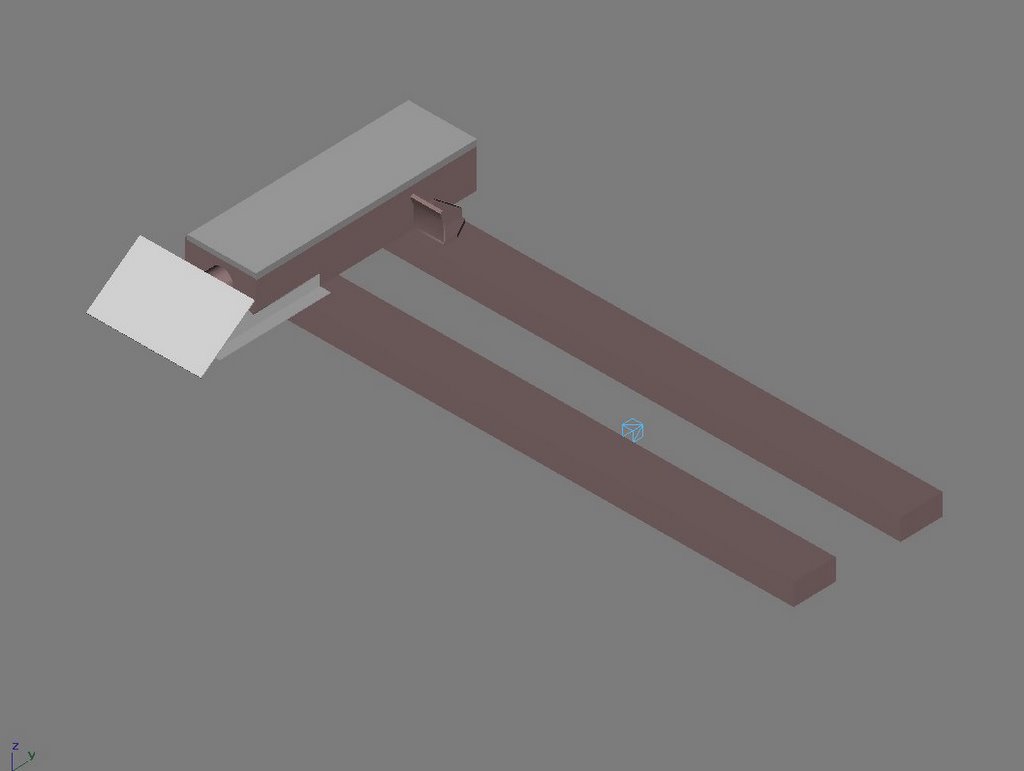 I spent last night mapping faces on the Train Stop to a texture file. I ended up with 34 faces, which to me seems like too many - especially considering they all map to the same file. Im wondering how Trainz handles that (will it keep 34 copies of the texture image in memory?). In the Flight Simulator world, the normal practice is to place all of the textures (diferent views of the plane) into one big file. That seems fairly normal to me, but the Trainz assets I have seen all seem to have multiple texture files with a few pieces in each one. The FlightSim way seems tidyer to me, so that is the approach I am taking initially.
The picture above is really rough. I threw together a basic texture image to get the mapping done. I did it a slightly different way, mapping all of the 34 faces to three different texture blocks within the file, rather than using LithUnwrap to map each face to a seperate region of the file. The picture is missing the animated trip lever, but you can see b.r.main, the small wireframe dummy that controls the animation. I will play around with the texture some more next time, but for now the hard part (the mapping) is done. I discovered a few components that will need to be mapped seperately if I want to add detail to them. I havnt mapped the trip lever yet.
Provided my wife doesnt want to drag me to the beach tomorrow or something, I should get some more done on the Tangara. Most of that time will probably be spent re-adjusting everything since Mikkk has provided some extra dimensions that I didnt have before. More work, but It has to be done.
Sleep is good.
Thursday, December 08, 2005
Train Stop
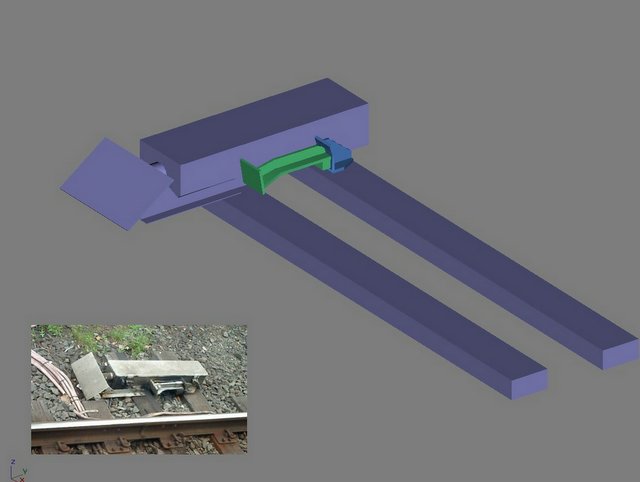 Ok, so here is the pic of the Train Stop that I wanted to post yesterday. Windows finally finished resyncing the RAID array, and now I can access my drives again.
I have a little bit to finish, and then its off to the texture factory for a coat of paint. Then after a brief stop at the scripting works, it should be ready for testing. Its animated, and will follow the signal its attached to.
Its great having little things like this one to do. It breaks up the monotony. Ive been staring at the Tangara for days now, every little moment of spare time I get. Having small projects like this one allow me to step back and focus on something else for a while. The catenary will be my relief when this one is finished, and then when thats done, I have another small project (a couple of buffer stops) that I can switch to.
The main buffer will be the big wooden type, like those seen at Sydney Terminal. Constructed with 9 inch square posts, (Basically 2 sleepers together) they are fairly solid. There is also one at the north eastern corner of Central Electric, and a slightly simpler version at Bomaderry (Norwa). Im planning to do both types.
Time is the biggest problem. I keep announcing my ideas here, and adding things to the list, knowing that it will be months before some of them see the light of day. I guess I just have to keep at it.
But right now... I have some real work to do.
Sunday, November 27, 2005
What stopped the train?
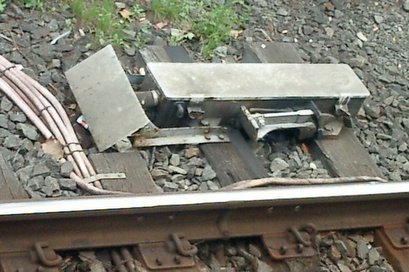 So, I spent all day yesterday working on the Tangara, with very little to show for it, other than a few smoothed edges. Im still learning gmax, so I dont know if its my methods or the less-than-intuitive software that is causing the problems (probably the former) but nothing seemed to work. I cant seem to get the curvature of the roof right at the front. Maybe I just have to approach it a diferent way. I'll think about it some more and try again next time.
Another thing I've been wanting to model is a Train Stop (see the picture). This gizmo sits next to a signal and when the signal is red, the little arm near the back is raised up to activate the brakes on any train that tries to go against the signal. In Sydney, the suburban trains often trip past them, meaning they stop at the red signal, wait a couple of minutes, then move forward a few feet until this thing trips their brakes, then stop again (duh) and wait for the brakes to recharge.
In Trainz, if a train passes a signal at stop, the emergency brakes are activated. Why? What trippped them. Maybe the driver is asleep and didnt see the signal, and so cant operate the brakes either? This little baby is the answer, and will forever banish the question: "Ok, but what exactly stopped the train?".
I have the model about half way finished already (its fairly simple as you can see) but the hard part will be scripting it. I know there are a few existing scripts that do something silimar to what I need, so hopefully I can use them as a learning tool, and combine a few ideas from each to create what I need. (With credit where its due of course).
I finally figured out that the S Sets on the DLS must have the required attachment points for a cab. Its a pitty about the one chosen though - I feel like im driving a truck. Pedels and a round wheel like thing? What the!? Im thinking about doing an upgrade. Building a cab and dropping it in. I'll see how I go. I might do an M Set cab as well, for the bug.
Subscribe to:
Posts (Atom)